Setting up an BGP Neighborship Connection
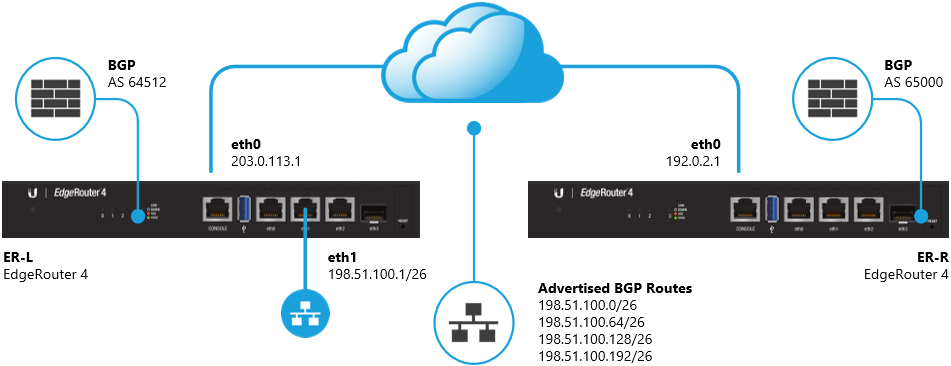
In the example diagram above, an eBGP neighborship is set up between ER-L (AS 64512) and ER-R (AS 65000) which allows the neighbors to exchange routing information. In this case, ER-L will advertise the 198.51.100.x/26 networks to ER-R.
Follow the steps below to configure the BGP protocol on both routers:
CLI: Access the Command Line Interface on ER-L.You can do this using the CLI button in the GUI or by using a program such as PuTTY.
1. Enter configuration mode.
configure
2. Define the BGP Autonomous System (AS) number and the Router ID.
Copy
set protocols bgp 64512 parameters router-id 203.0.113.1
3. Define the IP address and AS number used by the BGP neighbor.
Copy
set protocols bgp 64512 neighbor 192.0.2.1 remote-as 65000
4. As the neighbors are not directly connected, enable ebgp-multihop and additional options such as soft-reconfiguration.
Copy
set protocols bgp 64512 neighbor 192.0.2.1 ebgp-multihop 255
set protocols bgp 64512 neighbor 192.0.2.1 soft-reconfiguration inbound
NOTE:The value set in the ebgp-multihop... command can be customized.
5. Create blackhole routes for the 198.51.100.x/26 networks that should be advertised into BGP.
Copy
set protocols static route 198.51.100.0/26 blackhole
set protocols static route 198.51.100.64/26 blackhole
set protocols static route 198.51.100.128/26 blackhole
set protocols static route 198.51.100.192/26 blackhole
6. Advertise the 198.51.100.x/26 routes into BGP by using the network statement.
Copy
set protocols bgp 64512 network 198.51.100.0/26
set protocols bgp 64512 network 198.51.100.64/26
set protocols bgp 64512 network 198.51.100.128/26
set protocols bgp 64512 network 198.51.100.192/26
NOTE:The network... statements in BGP must match the routes present in the routing table.
7. Commit the changes and save the configuration.
commit ; save
CLI: Access the Command Line Interface on ER-R.You can do this using the CLI button in the GUI or by using a program such as PuTTY.
1. Enter configuration mode.
configure
2. Define the BGP Autonomous System (AS) number and the Router ID.
Copy
set protocols bgp 65000 parameters router-id 192.0.2.1
3. Define the IP address and AS number used by the BGP neighbor.
Copy
set protocols bgp 65000 neighbor 203.0.113.1 remote-as 64512
4. As the neighbors are not directly connected, enable ebgp-multihop and additional options such as soft-reconfiguration.
Copy
set protocols bgp 65000 neighbor 203.0.113.1 ebgp-multihop 255
set protocols bgp 65000 neighbor 203.0.113.1 soft-reconfiguration inbound
NOTE:The value set in the ebgp-multihop... command can be customized.
5. Commit the changes and save the configuration.
commit ; save
The BGP neighborship and advertised/received routes can be verified with the following commands:
show ip bgp summary
show ip bgp
show ip bgp neighbors 192.0.2.1 advertised-routes
show ip bgp neighbors 192.0.2.1 received-routes
Additional BGP Options
There are many other BGP options and additional features that can be configured when using BGP. Some of the more popular options are:
- Route-Maps
- Prefix-Lists
- BGP Communities
- Peer Groups
- Route Reflectors
- Confederations
See the output below for a list of available commands (output may differ between firmware versions):
set protocols bgp 64512 ?
Possible completions:
  address-family                    BGP address-family parameters
  aggregate-address                 BGP aggregate network
  dampening                         Enable route-flap dampening
  maximum-paths                     BGP multipaths
  neighbor                          BGP neighbor
  network                           BGP network
  parameters                        BGP parameters
  peer-group                        BGP peer-group
  redistribute                      Redistribute routes from other protocols into BGP
  timers                            BGP protocol timers

set protocols bgp 64512 parameters ?
Possible completions:
  always-compare-med                Always compare MEDs from different neighbors
  bestpath                          Default bestpath selection mechanism
  cluster-id                        Route-reflector cluster-id
  confederation                     AS confederation parameters
  dampening                         Enable route-flap dampening
  default                           BGP defaults
  deterministic-med                 Compare MEDs between different peers in the same AS
  distance                          Administratives distances for BGP routes
  enforce-first-as                  Require first AS in the path to match peer's AS
  graceful-restart                  Graceful restart capability parameters
  log-neighbor-changes              Log neighbor up/down changes and reset reason
  no-client-to-client-reflection    Disable client to client route reflection
  no-fast-external-failover         Disable immediate sesison reset if peer's connected link goes down
  router-id                         BGP router id
  scan-time                         BGP route scanner interval

set protocols bgp 64512 neighbor 192.0.2.1 ?
Possible completions:
  address-family                    Parameters relating to IPv4 or IPv6 routes
  advertisement-interval            Minimum interval for sending routing updates
  allowas-in                        Accept a route that contains the local-AS in the as-path
  attribute-unchanged               BGP attributes are sent unchanged
  capability                        Advertise capabilities to this neighbor
  default-originate                 Send default route to this neighbor
  description                       Description for this neighbor
  disable-capability-negotiation    Disable capability negotiation with this neighbor
  disable-send-community            Disable sending community attributes to this neighbor
  distribute-list                   Access-list to filter route updates to/from this neighbor
  ebgp-multihop                     Allow this EBGP neighbor to not be on a directly connected network
  fall-over                         Fall-over detection
  filter-list                       As-path-list to filter route updates to/from this neighbor
  local-as                          Local AS number
  maximum-prefix                    Maximum number of prefixes to accept from this neighbor
  nexthop-self                      Nexthop for routes sent to this neighbor to be the local router
  no-activate                       Disable the Address Family for this Neighbor
  override-capability               Ignore capability negotiation with specified neighbor
  passive                           Do not initiate a session with this neighbor
  password                          BGP MD5 password
  peer-group                        IPv4 peer group for this peer
  port                              Neighbor's BGP port
  prefix-list                       Prefix-list to filter route updates to/from this neighbor
  remote-as                         Neighbor BGP AS number [REQUIRED]
  remove-private-as                 Remove private AS numbers from AS path in outbound route updates
  route-map                         Route-map to filter route updates to/from this neighbor
  route-reflector-client            Neighbor as a route reflector client
  route-server-client               Neighbor is route server client
  shutdown                          Administratively shut down neighbor
  soft-reconfiguration              Soft reconfiguration for neighbor
  strict-capability-match           Enable strict capability negotiation
  timers                            Neighbor timers
  unsuppress-map                    Route-map to selectively unsuppress suppressed routes
  update-source                     Source IP of routing updates
  weight                            Default weight for routes from this neighbor